
Software Features
User Features
JS Interactive Maps
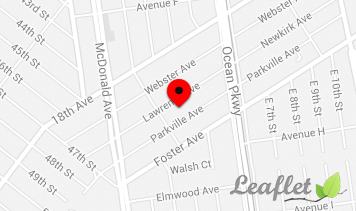
We proudly use the open source JavaScript library - LeafletJS, which powers all the maps in the script and plugins, and by default offers 4 free map tile providers - OpenStreetMap, CartoDB, Google, which is also free, and Yandex.
Ads without Registration
A time saving feature that enables your users to post ads without signing up. Don't make your users go through lengthy registration process, but rather let them post their ads right away.
Booking
You can easily enable a rental option on your site by installing the booking module that allows your users to book listings online and collect down payments featuring 3 most wanted booking modes.
Listing Preview
The module adds another step to the "Add a Listing" process allowing users to preview and edit their ads before they will be published on your site.
Geocoding
Getting coordinates and autocompletion for locations can be easily done with the built-in PHP Geocoding and JS Geo Autocomplete Widget, which support 3 free service providers - OpenStreetMap, ArcGIS and Google Places (paid after limit).
Facebook Connect
Not all users are willing to go through registration process today while signing up via Facebook is easy and fast. Let your users create accounts on your site using their Facebook details.

Search on Map
Searching listings on free maps offered in our classified script is a perfect built-in tool for your customers to search for listings around a particular location with closely located listings grouped into clusters.
Custom Subcategories
If a user didn't find a relevant category when adding his listing he'll be able to add a subcategory to your site from front end and be the first to add a listing.
Compare Listings
The Compare Listings is a useful module that allows your users to easily compare a few cars or homes in a nicely formatted table.
My Packages
A section in the Account Area that allows users to keep track of all packages purchased, renew or buy new ones and check other stats.
Alerts for Matching Ads
If a user didn't find anything on your site he can add an alert for new listings, and get email notifications once a matching ad is posted.
Adding Ad Details in One Step
The ability to select a package, add listing details and multimedia on one page will attract even more users to your classifieds site.
Standalone Seller Page
A SEO friendly profile page generated for a seller either on a subdomain or in a subdirectory and offering all ads of a seller and contact info.
Payment Gateways
Flynax offers a dozen free and premium payment gateways pre-integrated in the script, so you can easily monetize your site with a few clicks.
Ad Image Rotation
When uploading ad photos, your users can rotate them to make them look right if their photos are the wrong way up or back-to-front.
Coupon Code
To increase sales, you can generate coupon codes for individuals or user groups allowing them to purchase listing packages and plans at discounted prices.
Featured Ads
The feature offers you a good opportunity to monetize your site by offering featured packages to your users. Featured listings are always shown at the top of the list.

FAQs
Adding a box with frequently asked questions and html-formatted answers on any page will let your customers use your site more effectively.
Script security and protection
You may rest assured that your sensitive data is safe because all our classified scripts are well protected from spam, brute-force attacks, crawlers, SQL injections, and data are encrypted.
Listing Carousel
Coupled with Listing Boxes, the Carousel module allows you to add a compact box with a sliding effect that can show featured, random, popular, recent and top rated ads.
Testimonials
The plugin gives your users the ability to share their positive feedback with other users. You may add the box with testimonials on any page of your classifieds to make your site more attractive to visitors.
Print Version
A printable light page with the most important details of a listing: a main picture and description including seller details.
Category Look
Flynax gives you some flexibility in setting a number of category columns, visible subcategories, adding icons to categories etc.
Search in My Listings
Some sellers on your site might offer hundreds of ads. With the Search in My Listings, they will be able to quickly find needed listings.
Hiding phone numbers
Hiding phone numbers of ad owners is a good way to protect users' contact details from various parsers and bots.
Exporting/Importing Bulk Ads
Both you and your dealers will be able to import or export listings in XLS and CSV formats to your site, including pictures, both from back and front ends.
Accounts and Subaccounts
With the subaccount module, your users may create corporate profiles or agencies with all their agents and listings in separate tabs.
Similar Ads
Similar Ads module increases the odds of a successful sale. The module shows similar ads in a special box on listing details page based on criteria, which you may specify for every category from back end of your site.
Boosted performance with PHP8New
All our classified scripts offer support for PHP8, which boosted their performance and efficiency, and ensured their compatibility with the most advanced hosting environments.

Report Listings
If you get a lot of ads posted daily you may leave moderation of listings partly with your users, who will report irrelevant, fake, scam or incomplete ads to you via a special form.
Monetizer
The module represents another way to quickly monetize your site by selling bump-up and highlight packages to users. By purchasing packages users will be able to bump up their ads to the top of the list and highlight them to make them stand out from the rest.
Search for Ads
Flynax offers quick and advanced search for ads of available listing types allowing you to populate search forms with custom fields.
Filter
A must-have module with flexible settings that allows your users to filter through numerous listings of a particular listing type or category. The Filter offers sliders, range selectors and radio buttons.
Payment History
As part of transparency policy, our script allows your users to keep track of all the payments made through your site from the Account Area.
Search for Listings on Seller Page
Configurable search for ads on the seller page allows your users to quickly find needed listings by selected criteria.
Multimedia Uploads
Apart from adding description to listings, sellers can easily upload photos and videos by dragging and dropping to give more visual information to potential buyers.

Keyword Search
Keyword search provides a simple and fast way for users to search for listings. The search offers a few options for narrowing down search results, and can be easily integrated into Advanced Search.
Multilingual Interface
With a dozen languages and values of dropdowns translated into other languages you can target a particular country or go international.
Category Tree
Adding a tree of categories and subcategories to any page of your site in a separate box may contribute to a better navigation and browsing experience on your site.
Search for Sellers
Flynax offers two search forms for sellers: alphabetical search based on values of a particular field and advanced one.
Internal Messaging
Our script comes with a built-in messaging system that allows buyers to contact sellers through a contact form imitating a chat session, and get copies of messages.
Login Attempt Control
Login attempt control for back and front ends protects your site from brute forcing and different automatic scripts blocking them for one and more hours.
Semitic Language Support
All our graphical templates offer full support for Semitic languages like Arabic or Hebrew in terms of text direction, logo and content boxes.
Price History
To show how prices change for listings over periods, you may install our free module that builds a chart with the price history after every change.
Locations in URLs of ads and users
To provide better geo-targeted results in the SERPs, you may enable locations in URLs of ads and user accounts so your potential customers could find you faster.
Fully Responsive Themes
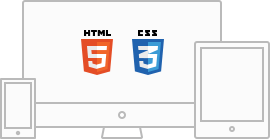
To keep up with the latest IT trends we offer you only fully responsive templates built on HTML5, CC3 and Bootstrap 4. All our templates are retina ready, and the recent templates offer support for Sass.
Movable content boxes
Using standard content boxes, you can easily rearrange the structure of your classified theme by moving the boxes around the template. That is, you may select pages and categories for a box and populate it with a custom content, be it a PHP code, HTML, image or content of a plugin, for example featured listings, etc.
Posting Ads in Steps
Posting ads might be divided into separate steps, which allows your users to add details in steps in order to avoid confusion and omission of important data.
Easy-To-Access Contact Buttons in Mobile
The contact buttons fixed at the bottom of the screen in the mobile interface make contacting sellers easy and fast. No need to scroll the lengthy seller page for contact details.
Recently Added Ads
A SEO friendly page that shows a list of the latest ads with recent ones displayed at the top and old ones moving down.
WebP Format
WebP is the most favored format by search engines and recommended by Google Speed Insights. Storing images in the WebP format allows you to reduce the size of files up to 40%, which contributes to higher load speed on the user side and better LCP metric.
WhatsApp, Viber, and Telegram AppsNew
Using the most popular messaging Apps is a perfect alternative to a built-in chat module. Sellers may enable the Apps selectively for their phone numbers to ensure fast communication with buyers.

Currency Converter
The Converter offers more than sixty world currencies. After installation it will show all prices on the site in a currency based on a user location.
Cookie Policy
To comply with cookie policy introduced in some countries you can install our add-on that notifies all new visitors about saving browser cookie.
Weather Forecast
A useful widget offering a regularly updated forecast from Yahoo and a number of weather condition icons shown in a box or on listing details.
Listings Navigation
A simple add-on for switching between previous and next listings in categories and search results page offering a back-to-search-results link.
Membership Plans
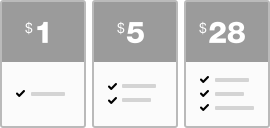
Membership plans are a great way to monetize your site. Add your custom plans and start charging users for posting ads, access to contact details, photos and premium accounts.
Autocomplete Option for Dropdowns
To make the selection of attributes from dropdowns in the mobile version faster and more user-friendly, we offer an autocomplete search.
Static Maps
Using static maps will bring two major benefits to your site, which includes the ability to more wisely use resources and contributes to fast page load. The Static Maps are represented by two service providers - Google Static Maps (paid after exceeding the limit) and free Yandex Static Maps.
Refine Search
Refine search is a mirror reflection of the advanced search, which is displayed in the sidebar on the search results page and enables users to narrow down search results by certain criteria.
Location Filter
Location Filter might be a useful add-on if you get listings from different locations. After identifying a user location by his IP, it will filter all listings on the site and show those that are specific to a user location.
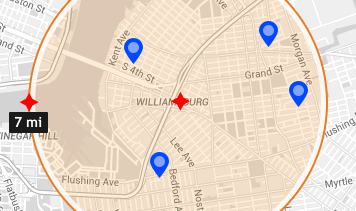
Search by Distance
Searching for ads within a specific radius by a zip code or location allows users to immediately get search results within their location.
List and Gallery Grids
Flynax offers both list and gallery grids for listings in categories and on search results page. Modes are enabled from front end with an icon.
QR Code
The module generates a QR code for every ad, which allows your users to easily and instantly scan and save ad details to their mobile devices.
Tag Cloud
The module transforms search keywords to tags showing the most popular keywords in a tag cloud. You can manage all tags from back end in terms of weight and look.
Banners
With the module both admin and users can add banners in html, swf, png, gif and jpg formats being able to target a particular country.
Ads in PDF Format
The ability to export ads to PDF format is another useful feature, which makes sharing, emailing and storing ads more convenient.

Pay-As-You-Go Credits
Acting as an alternative currency on the site the credits allow your users to use the balance for a period of time featuring immediate payments.
Loan/Mortgage Calculator
The calculator can be a useful add-on for users interested in items and wanting to calculate the amount to be paid without leaving your site.
Massmailer/Newsletter
The add-on features a solid manager with an html editor allowing you to send newsletters to subscribers and bulk emails to site users.
Rating Ads
A simple and time-tested way for users to evaluate ads in terms of fullness, multimedia uploaded, wording and product quality.
Polls
To make your site more interactive you can add a poll with a few options to choose from allowing users to vote for particular options.
Quick Favorites
Even if a user is not logged in or registered he will still be able to add listings that attracted his attention to Quick Favorites by clicking the star icon.
Metadata patterns for ads and accounts
Using field variables and text in between you may build unique metadata patterns for listings and user accounts where variables will be replaced with field values.
Admin Features
Form Builder
A drag'ndrop module that lets you build and edit forms for categories and user groups in a simple and fast way from the admin panel.
Unlimited Categories
Flynax has no limits to a number of categories, and you can add as many as you want enabling your users to add custom subcategories.

Moving Ads
If a user posted his ad to a wrong category or you want to move it to another category you can do it with a few clicks from admin panel.
Field Manager
Flynax comes with a set of pre-configured fields but you also can use 13 field templates to add custom fields both for ads and user accounts.
Categories by Listing Types
Categories are tightly related to listing types, which makes configuring categories of unrelated listing types like bags, bikes etc more flexible.
Data Entry Import
Using our free Data Entry Import add-on and built-in entry manager you may quickly populate a target field with values in XLS, CSV, and TXT formats.
Extra Functionality
Apart from feature-packed Flynax CMS you also can significantly boost functionality of your site by installing free plugins from admin panel.
User Group Manager
You can easily manage user groups, build custom registration forms, set accessible sections, ways of confirming new accounts etc.
Plan Usage Limit
If you have free plans you can always limit the number of times they can be used in order to encourage users to upgrade to paid plans.
Watermarking photos
To copyright listing photos added to your site, you may use our built-in watermarking module that allows you to add both graphical and textual watermarks, or tile the entire image.
Notification for every event
Every event in the script is followed by the email notification that the script sends in order to either notify or urge the user to take an action. You can always edit the notification templates from the email template manager.
Remote Ads
The add-on enables both users and visitors to show your ads in a neat box on other sites by copying and pasting a piece of code.
Category Boxes
Gives the ability to show categories of a listing type on different pages or group categories of different listing types in a content box.
Interdependent Fields
A dynamic module that enables adding a set of interdependent fields, in which values of one field depend on selection in a previous one.
Approval of new listings
You can easily control new listings added to your site before publishing them. After reviewing new listings, you will be able to approve them in bulk with one click from the back end.
Google and Yahoo Sitemaps
An important add-on that generates an XML file making it easier and faster for Google and Yahoo to crawl and index pages of your site.
Plan Manager
You can easily add new plans for charging users with price, duration, multimedia and other settings managed individually for every plan.

Ads from Admin Panel
Posting ads like other functions is mirrored in admin panel enabling you to post ads from admin panel on behalf of another user.
One-click Plugin Installation
With all plugins accessible from admin panel installing and updating plugins is done with one click taking no more than a minute.
Custom Pages
You may add more pages with relevant content for specific keywords in order to improve search visibility and traffic, or simply to share new information with your users.
URL Transliteration
Transliteration of URLs of listings added in non-Latin languages is a standard script feature. Once disabled, it will allow you to generate URLs of listings in non-Latin languages providing more relevant data to search engines.
Site News
The site manager allows you to post news and other useful information with pics and videos on the site in a separate box. You can manage the pages and position of the box with news from the back end.
Ad Manager
With ads arranged into a user-friendly grid and all functions being handy you can easily manage ads: edit, activate ads, approve multimedia etc.
Language Manager
Whether you want to translate the script into another language or edit the existing translation, you can do it right in the grid from the language manager.
Listing Types
A set of basic configurations that offers you freedom to add custom sections like bikes, bags, phones etc each configured independently.

Invoices
Invoices are an alternative way for the administrator to charge users; users can pay invoices through available payment gateways.
Category Manager
The manager allows you to manage categories, build seo-friendly urls, make subcategories inherit fields from other categories etc.
Field Groups
A convenient way to enclose related fields into groups in forms in order to make postings ads and creating accounts more structured.
User Approval
When adding a custom or editing existing user groups you can set if it is to be approved automatically via email or managed by admin.
Category Search
With advanced search for categories by: name, listing type, parent category etc you can find a needed category or subcategory in no time.
Upgrading/Downgrading Ads
Listing Manager gives you the ability to easily assign featured status to ads or remove status and downgrade an ad to a standard one.
Importing/Exporting Categories
To speed up importing or exporting numerous categories Flynax offers you the ability to add or extract your categories in csv or xls format.
Limited Access Admins
If you want to delegate a responsibility to administer certain site sections to another webmaster then the ability to add a limited access administrator will become a good solution.